Ad mockups and safe zones
Ad mockups in Focal’s asset view wrap an image or video in a simulated social feed, Story, Reel, TikTok, or YouTube ad, so you can see where platform UI such as handles, captions, engagement buttons, and call-to-action bars covers the frame before you export. Below the mockup guide is a safe-zone reference for vertical and YouTube placements; see Ad platform specifications for file-size, format, resolution, and duration limits.
Preview an asset in an ad mockup
Open an image or video in the asset view, from the asset library or a board task, and click the zoom menu in the top-right corner of the preview. It shows Fit and the zoom level, or the mockup’s name while one is active. Under Ad mockups, pick a placement to wrap the asset in that ad unit.
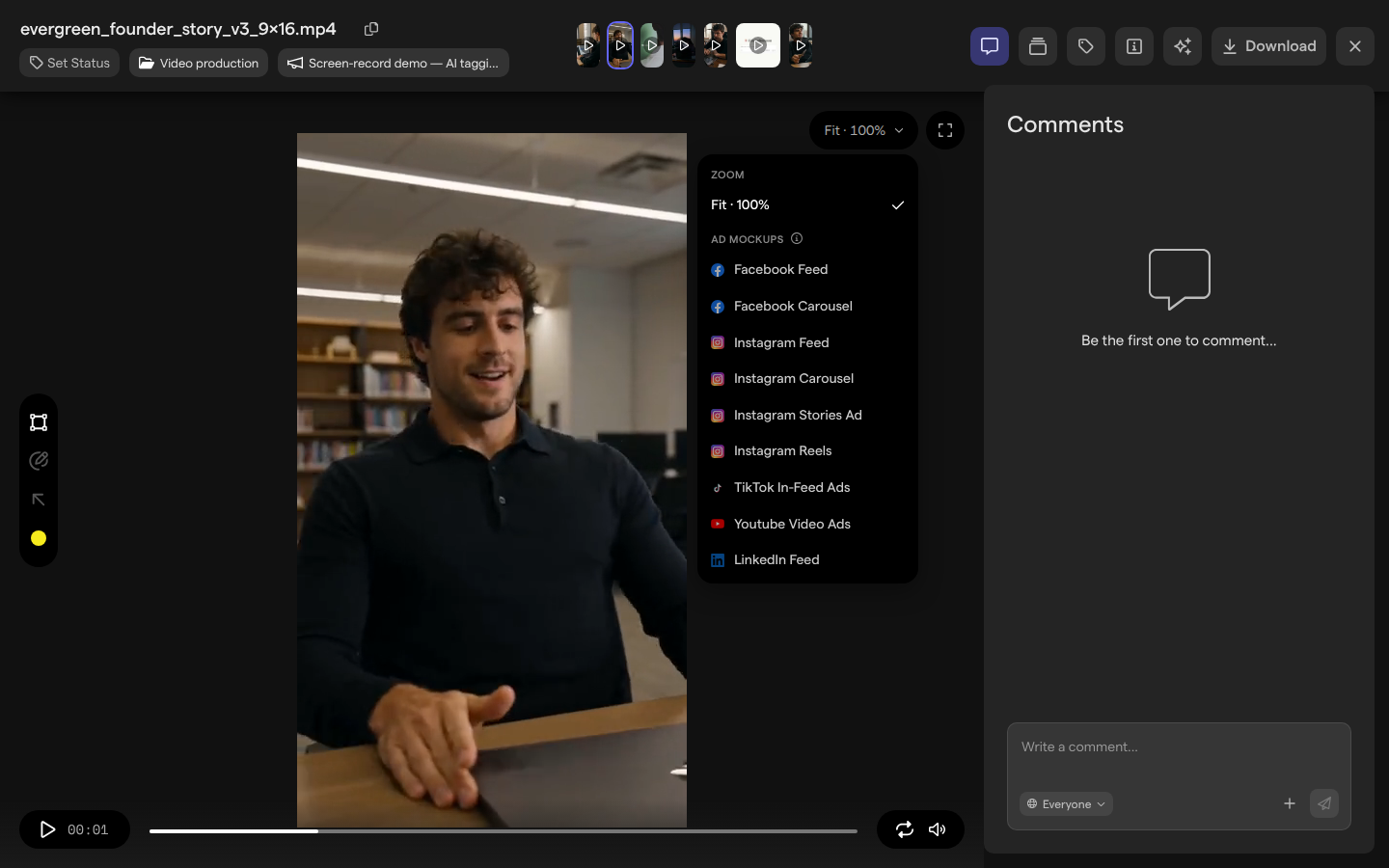
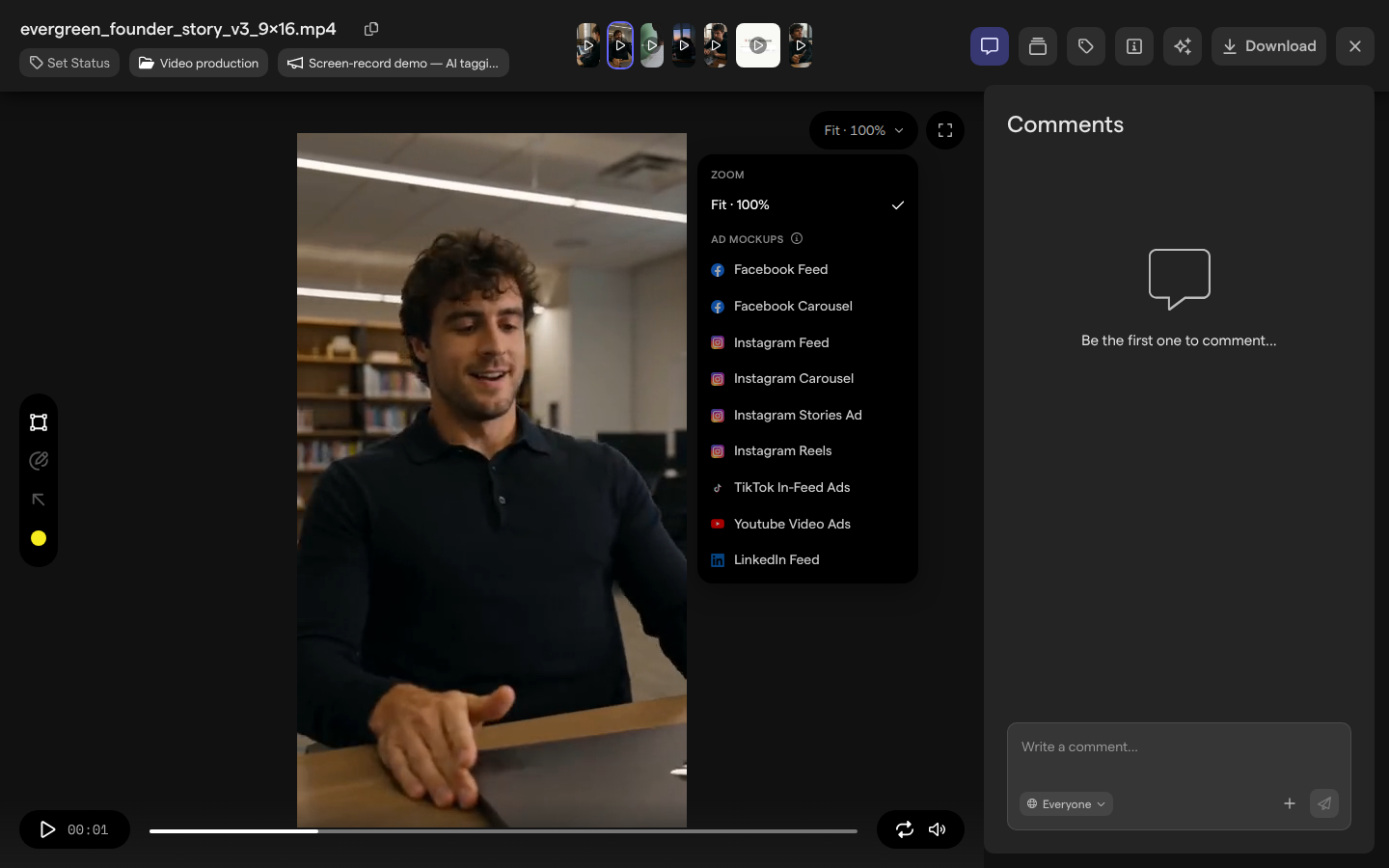
Focal includes nine ad mockups across five platforms:
| Mockup | Framing | Simulated UI |
|---|---|---|
| Facebook Feed | Scales to the card width, from 1.91:1 to 4:5 | Page header above; headline, Shop now button, and Like / Comment / Share row below |
| Facebook Carousel | Crops the asset to a square on the first of three cards | Page header above; a headline and Shop now button on each card; Like / Comment / Share row below |
| Instagram Feed and Instagram Carousel | Scales to the card width, from 1.91:1 to 4:5; the carousel shows card dots | Handle header above; a Learn more bar in a color taken from the asset, action icons, and caption below |
| Instagram Stories Ad | 9:16. Fills the frame when the asset is within 3% of 9:16, otherwise fits it and fills the bars with the asset’s main color | Progress bar, page name, and close icon at the top; Learn more button, heart and comment icons, and an Ad label at the bottom |
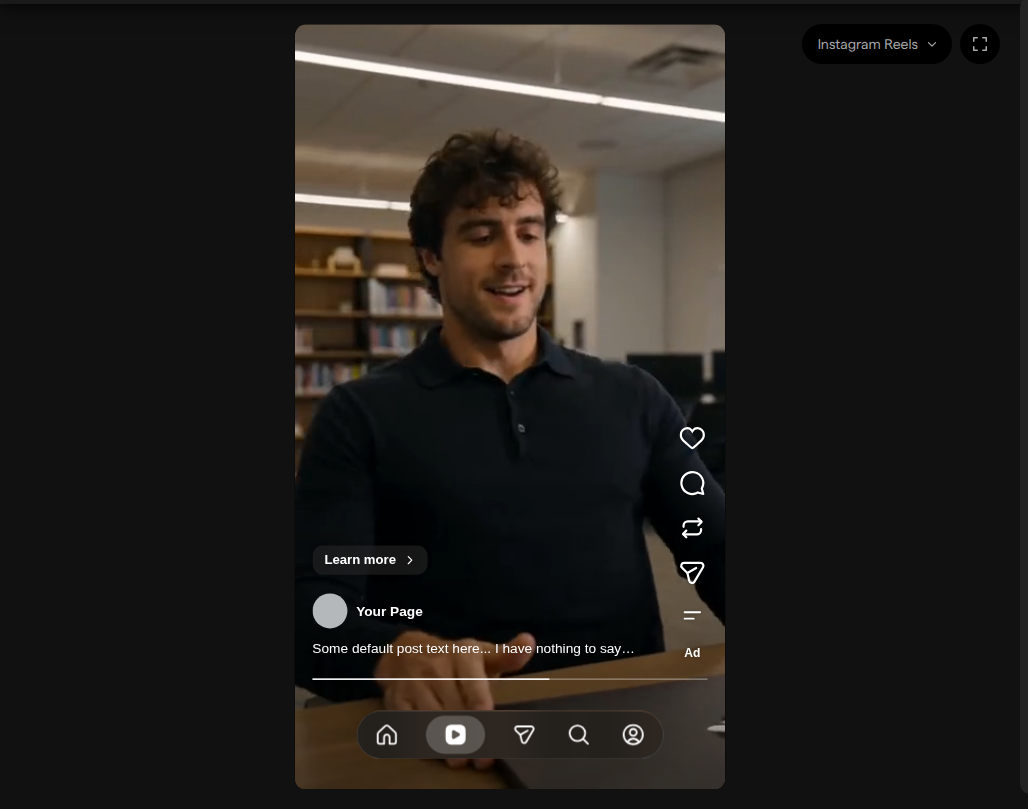
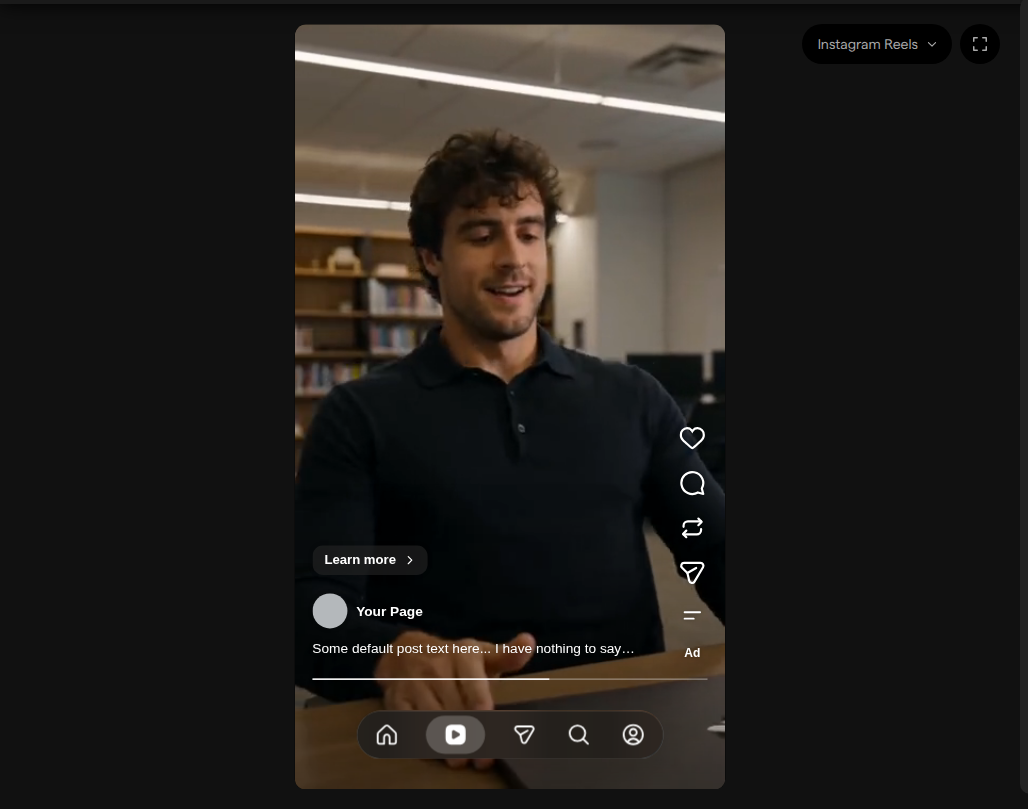
| Instagram Reels | 9:16. Fills the frame when the asset is within 3% of 9:16, otherwise fits it | Icon column with an Ad label on the right; page name, caption, Learn more button, progress bar, and Reels tab bar at the bottom |
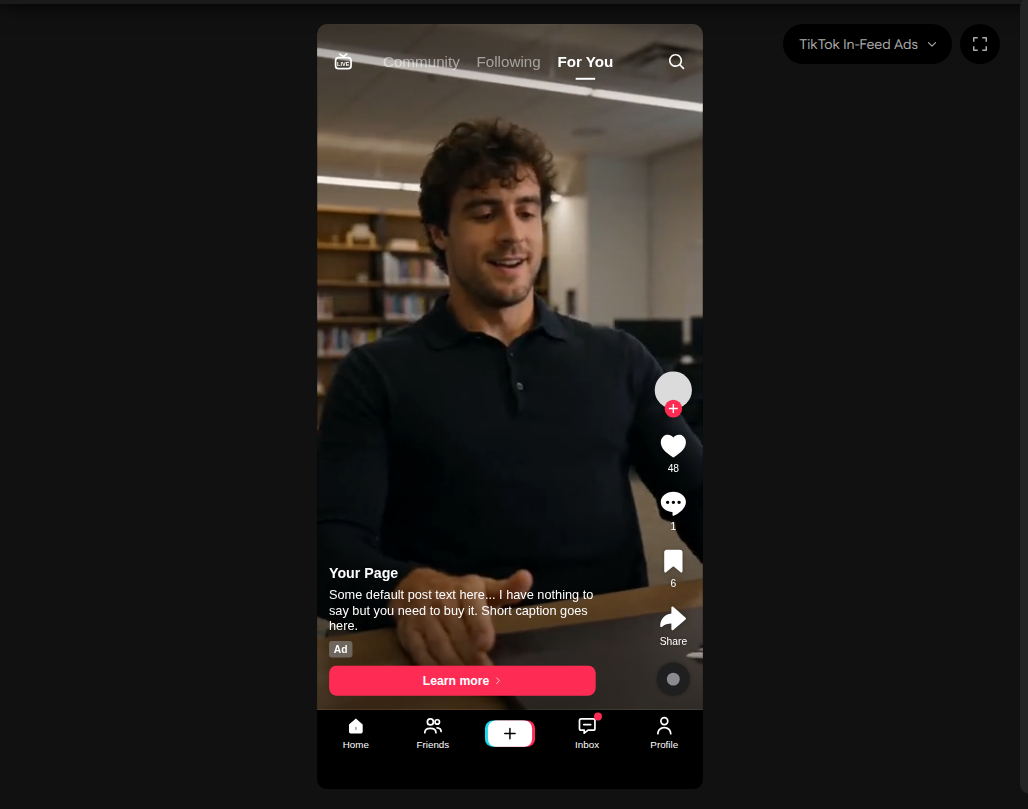
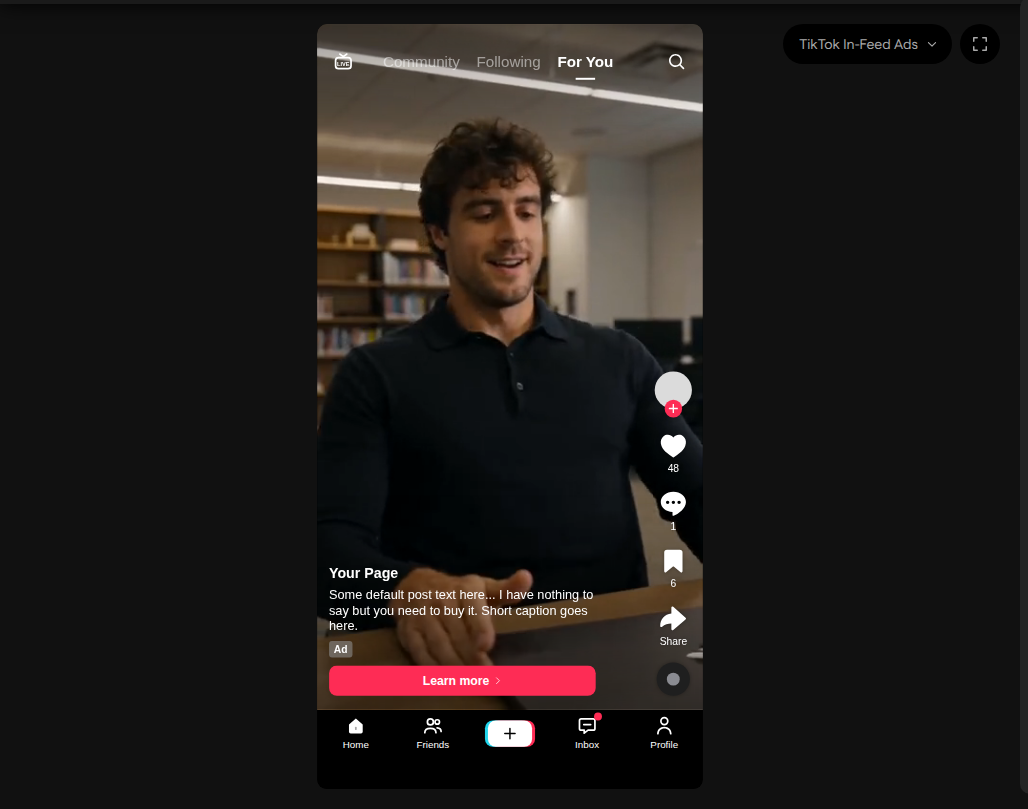
| TikTok In-Feed Ads | 9:16. Fills the frame when the asset is within 3% of 9:16, otherwise fits it | LIVE / Community / Following / For You bar at the top, engagement rail on the right, handle, caption, Ad label, Learn more bar, and bottom navigation |
| Youtube Video Ads | Scales between 16:9 and 9:16 inside the watch page | Sponsored badge, Visit advertiser, and Skip on the player; a panel with a headline and Learn more button below it |
| LinkedIn Feed | Scales between 1.91:1 and 4:5 inside a feed card | Company header and intro text above; headline and Learn more bar, and reactions row below |
Pick any option under Zoom in the same menu to return to the plain asset. Mockups approximate the real ad units; the ad platforms don’t provide them. In Reports, the ad details for a TikTok ad also show its video or image inside the TikTok In-Feed Ads frame, with the ad’s own handle, caption, and call to action.
Leave comments and annotations on a mockup
While an ad mockup is active, free zoom is turned off so the frame stays fixed, and comments and annotations are drawn over the mockup. An annotation saved while a mockup is selected remembers that mockup: clicking the comment later opens the same mockup and, for a video, jumps to the comment’s time. In full screen, clicking the comment jumps to the time without opening the mockup.
Safe zones
A safe zone is the part of the frame that platform UI doesn’t cover. Keep headlines, burned-in subtitles, logos, promo codes, and legal disclaimers inside it. To check assets against these safe zones, ask Focal Agent to run a creative QA review.
Note: These safe zones are a summary Focal compiled from each platform’s own guidance, last verified on November 16, 2026. Platforms change their apps and guidance without notice, so it can be out of date. The platform’s own page or file, linked under each platform below, is the source of truth: check it when placement matters or when something here doesn’t match what you see on the platform.
Vertical 9:16 safe zones
Full-screen 9:16 placements draw their UI directly over the video or image.
| Placement (9:16) | Top and bottom margins (at 1080×1920) | Left and right margins (at 1080×1920) | Safe area (1080×1920) |
|---|---|---|---|
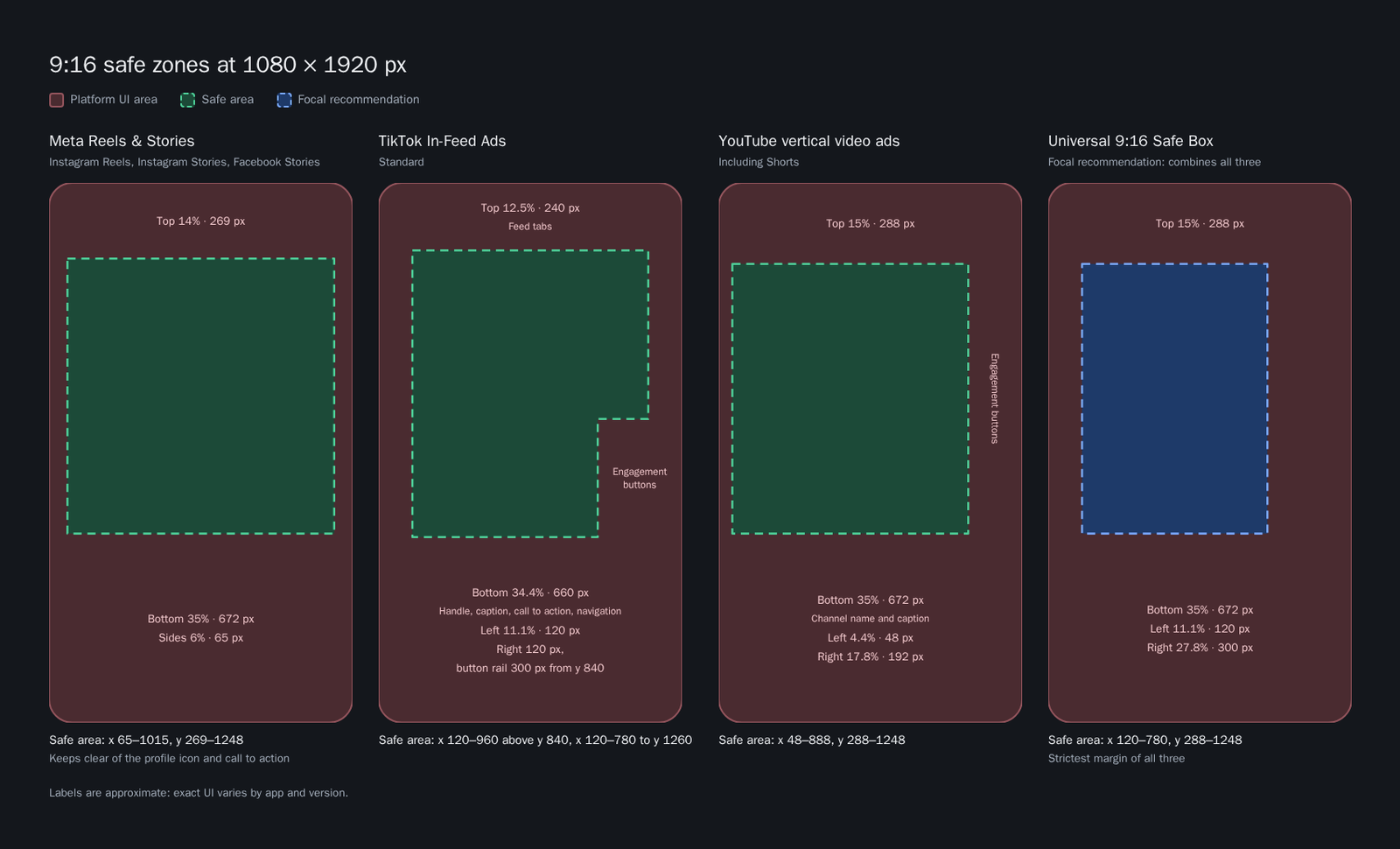
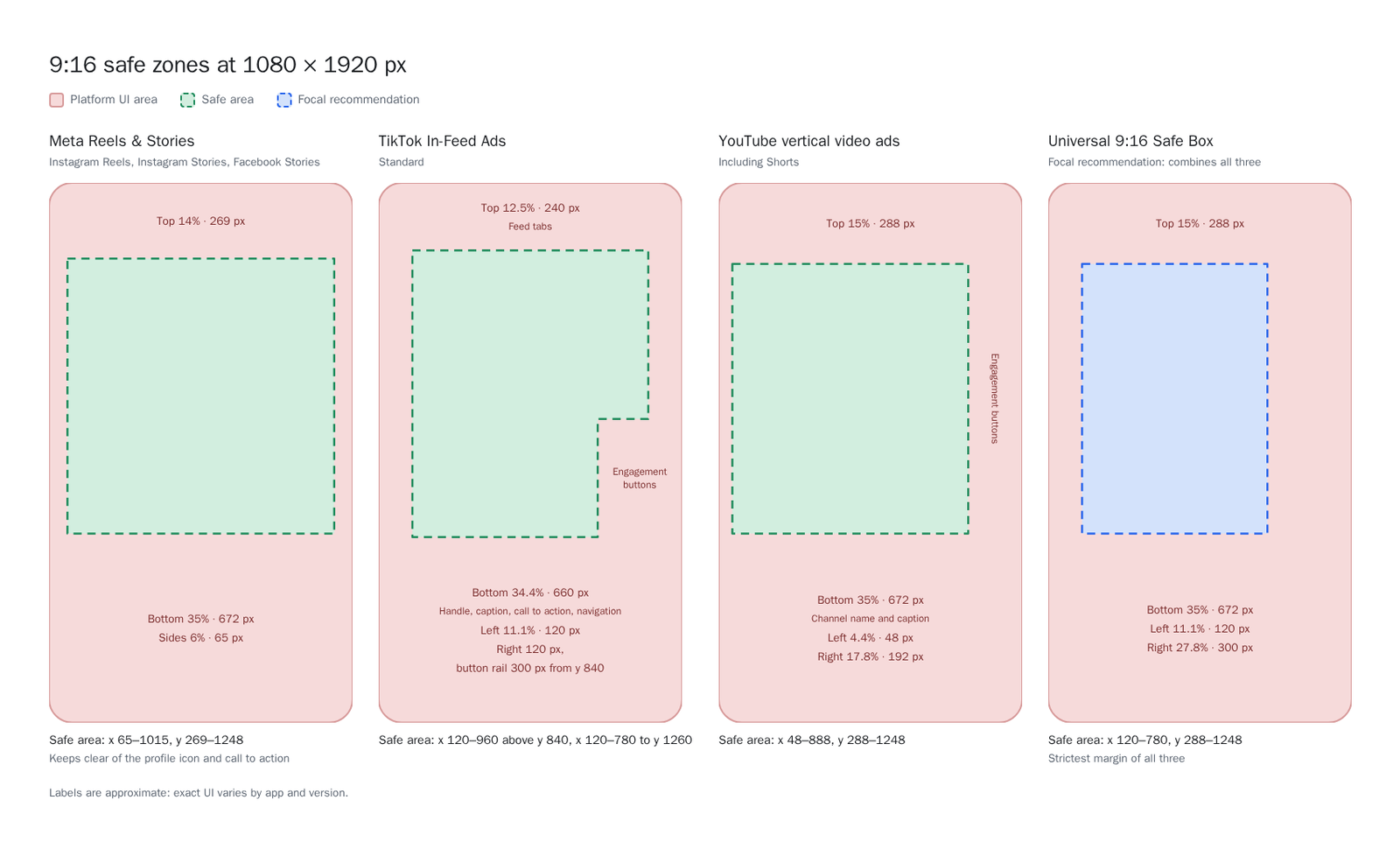
| Meta Reels & Stories (Instagram Reels, Instagram Stories, Facebook Stories) | Top: 14% (269 px). Bottom: 35% (672 px) | Left: 6% (65 px). Right: 6% (65 px) | x = 65 to 1015 px (950 px wide), y = 269 to 1248 px (979 px tall) |
| TikTok In-Feed Ads (standard) | Top: 12.5% (240 px). Bottom: 34.4% (660 px) | Left: 11.1% (120 px). Right: 120 px, widening to 27.8% (300 px) for the button rail from y = 840 | x = 120 to 960 px (y = 240 to 840), narrowing to x = 120 to 780 px (y = 840 to 1260) |
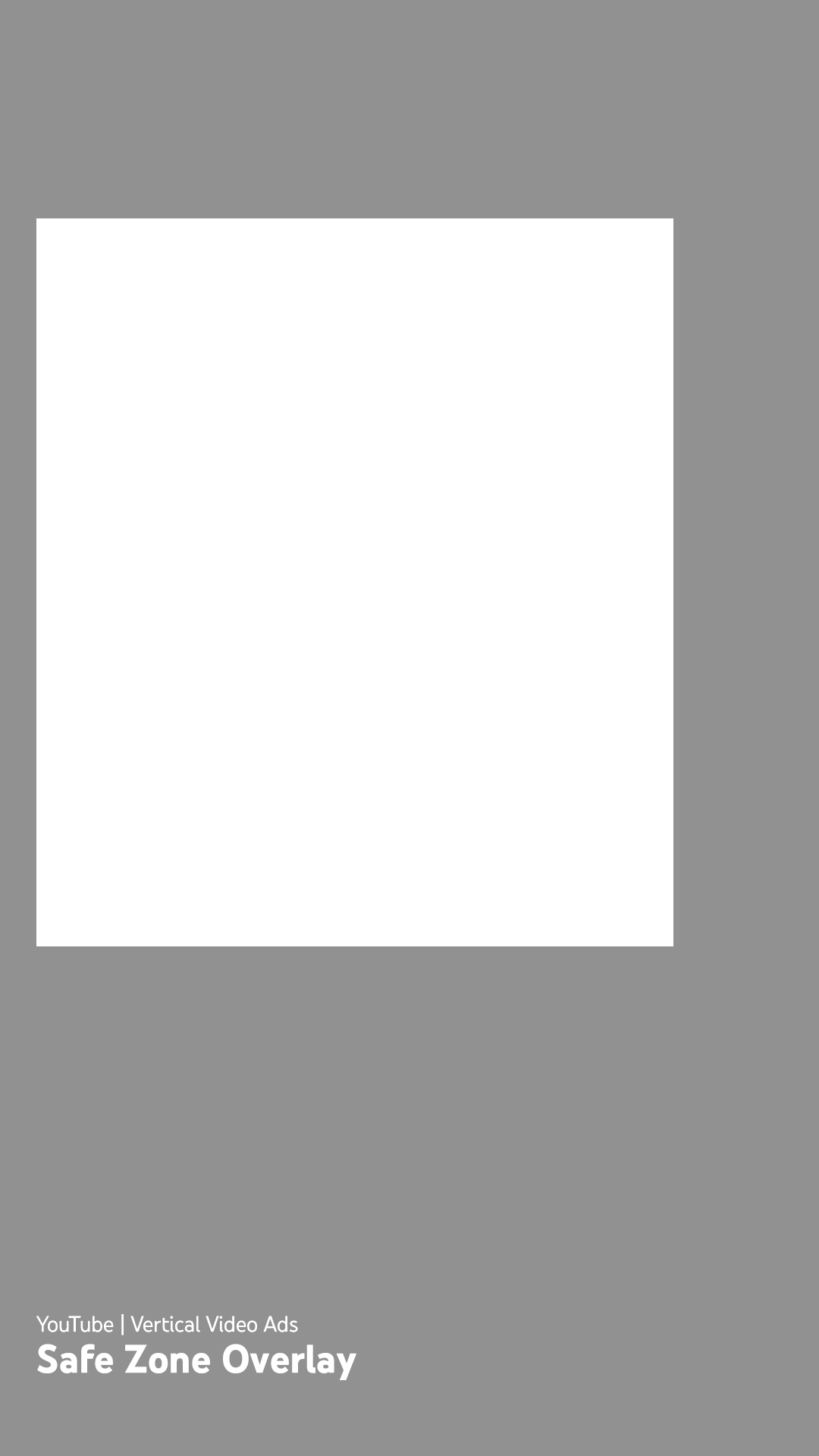
| YouTube vertical video ads (including Shorts) | Top: 15% (288 px). Bottom: 35% (672 px) | Left: 4.4% (48 px). Right: 17.8% (192 px) | x = 48 to 888 px (840 px wide), y = 288 to 1248 px (960 px tall) |
Tip: When one 9:16 cut runs on Meta Reels and Stories, TikTok, and YouTube, we recommend keeping text, burned-in captions, and logos inside the Universal 9:16 Safe Box: x = 120 to 780 px, y = 288 to 1248 px at 1080×1920 (top 15%, bottom 35%, left 11.1%, right 27.8%). It’s a Focal recommendation, not a platform rule: it combines the strictest margin from each platform above (YouTube’s top, Meta’s and YouTube’s bottom, TikTok’s left and button rail). It applies TikTok’s lower-right rail to the full height, so it’s narrower than any single platform needs.
Where each 9:16 safe zone comes from
- Meta: Meta’s Instagram Reels, Instagram Stories, and Facebook Stories pages suggest leaving 14% of the top, 35% of the bottom, and 6% on each side free of text, logos, and other key elements, so the profile icon and call to action don’t cover them. At 1440×2560 px, that’s 358 px at the top, 896 px at the bottom, and 86 px on each side. Facebook Stories carousels are different: Meta suggests leaving 14% (250 px) of the top and 20% (340 px) of the bottom free.
- TikTok: From the In-Feed Standard Version safe-zone file on TikTok’s In-Feed ads page, scaled from 720×1280 to 1080×1920. The file leaves 160 px at the top, 440 px at the bottom, and 80 px on each side, plus a 120 px button rail on the right that starts 720 px from the bottom. TikTok’s anchor-link files also draw the app’s UI on the template: the feed tabs in the top margin, the engagement buttons in the right rail, and the handle, caption, call to action, and navigation in the bottom margin. TikTok says the safe zone depends on the ratio, the caption length, and any add-ons: longer captions shrink it, ads with an anchor link have their own safe-zone files, and the right-to-left files put the rail on the left. In TikTok’s anchor-link files, four caption lines and an anchor raise the bottom margin to about 53% (1,014 px at 1080×1920).
- YouTube: Measured from Google’s vertical video safe-zone overlay (1080×1920), linked from Google’s video ad specs page. The overlay doesn’t say what sits in each margin; Google’s Shorts ads page names the channel name, captions, and engagement buttons as what to keep clear of, and gives smaller margins (top 10%, bottom 25%, right 10%). The overlay is the stricter of the two, so content inside it also clears the Shorts guidance.
YouTube horizontal and square safe zones
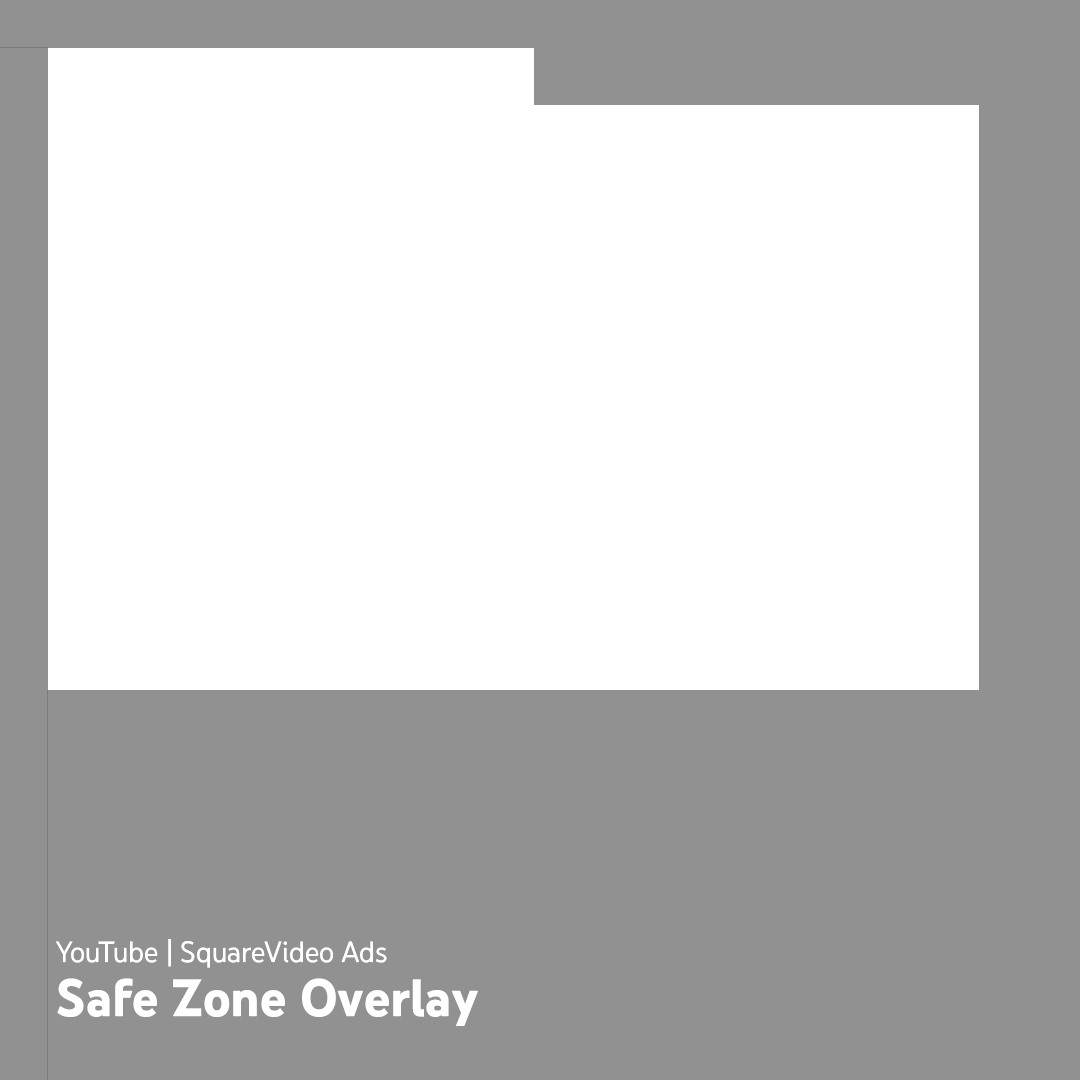
YouTube’s in-stream player draws badges, buttons, and a call-to-action card inside the frame for horizontal and square videos too. The figures below are measured from Google’s horizontal and square safe-zone overlays, linked from the video ad specs page.
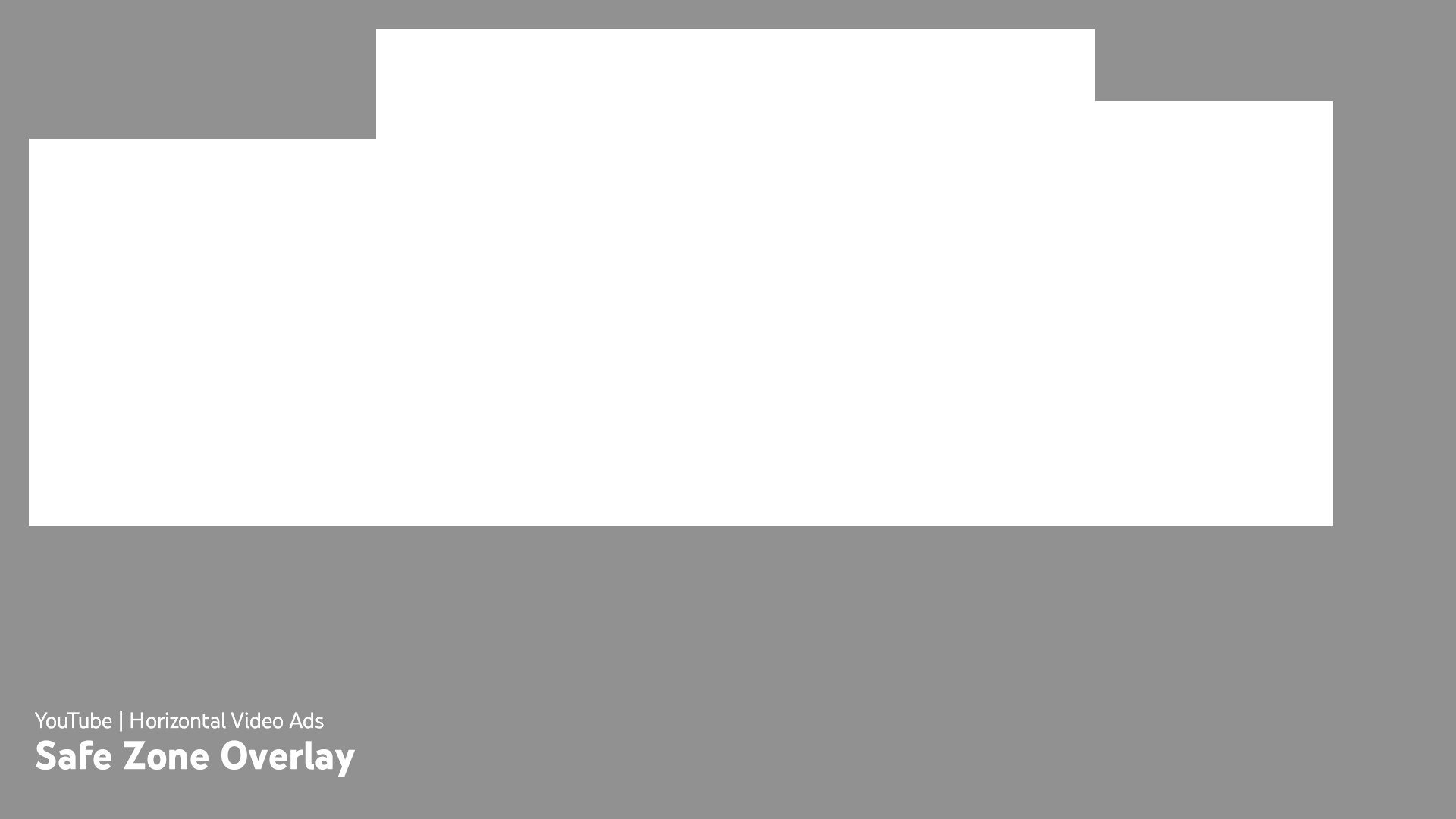
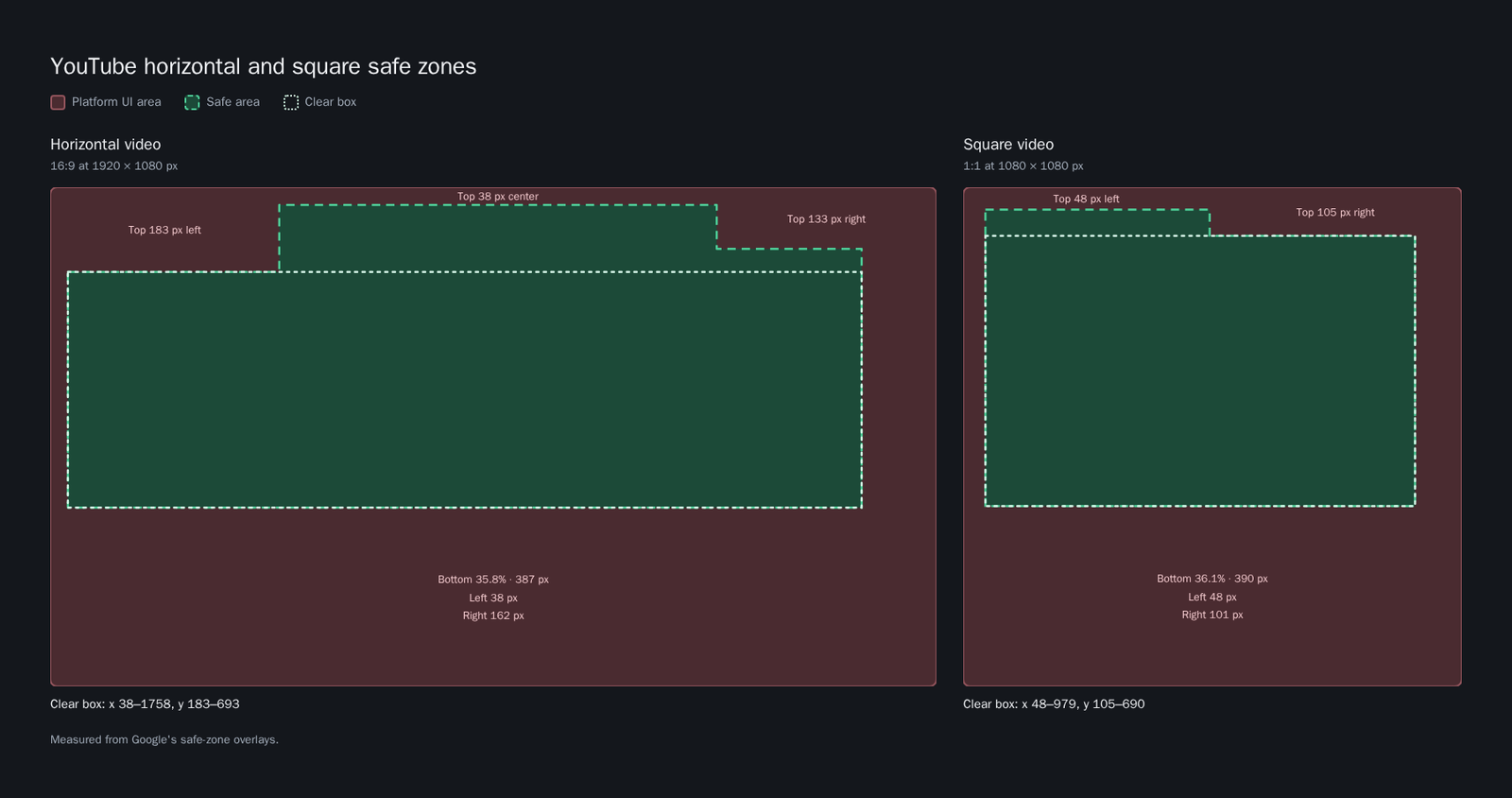
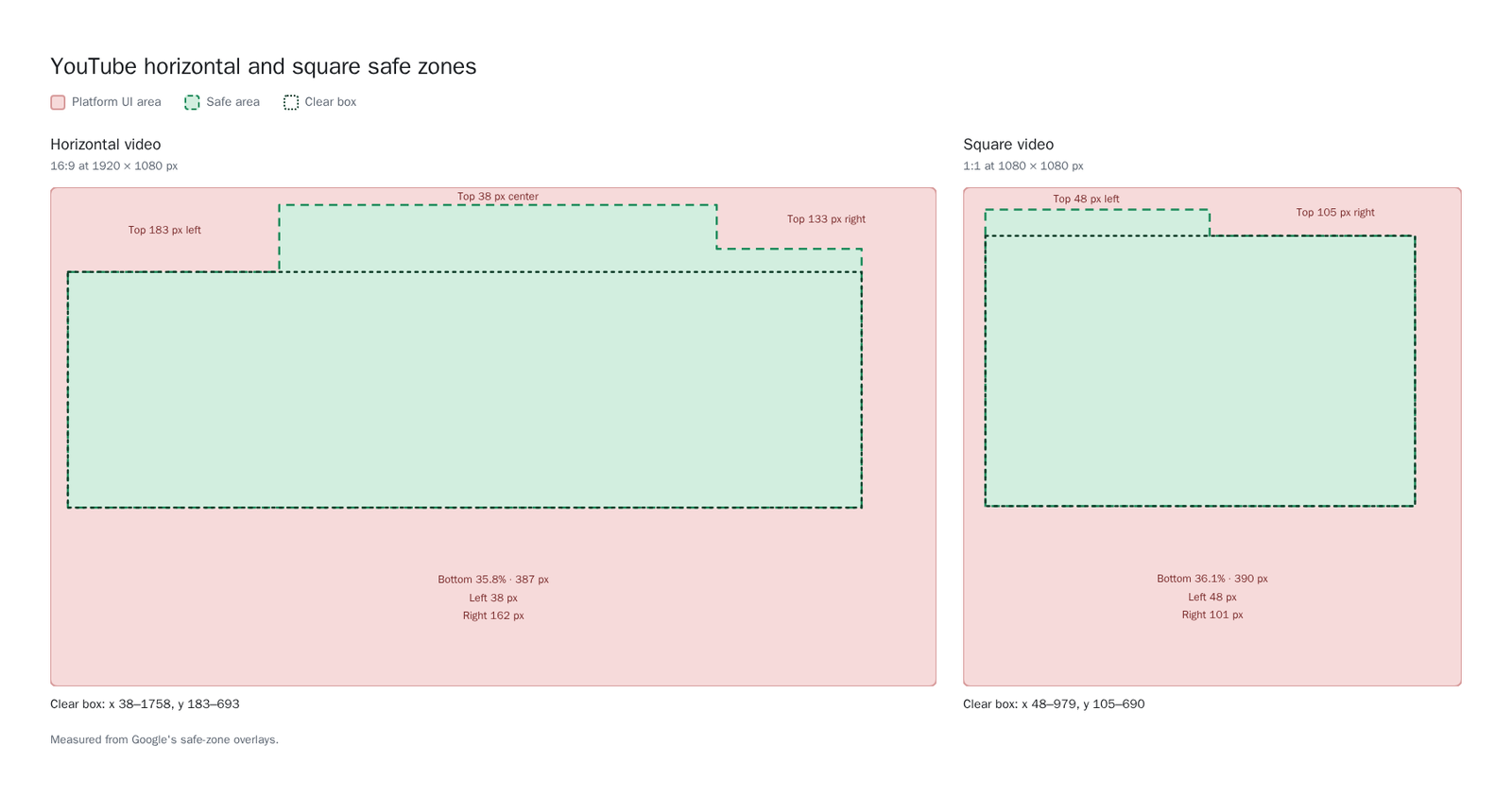
- Horizontal (16:9 at 1920×1080 px): The top margin is 183 px (16.9%) on the left, 38 px in the center, and 133 px on the right. The bottom margin is 387 px (35.8%), the left margin 38 px (2%), and the right margin 162 px (8.4%). One rectangle clear of every edge is x = 38 to 1758 px, y = 183 to 693 px (1720×510 px).
- Square (1:1 at 1080×1080 px): The top margin is 48 px on the left half and 105 px (9.7%) on the right half. The bottom margin is 390 px (36.1%), the left margin 48 px (4.4%), and the right margin 101 px (9.4%). One rectangle clear of every edge is x = 48 to 979 px, y = 105 to 690 px (931×585 px).
FAQ
Do ad mockups alter or crop the asset file?
No. Ad mockups are a preview inside Focal’s player. The stored asset and any file you download or export stay unchanged.
Why do burned-in subtitles near the bottom of a 9 video get covered?
Platform UI sits over the bottom of full-screen vertical ads. Meta’s Reels and Stories guidance and YouTube’s vertical overlay keep the bottom 35% (672 px at 1080×1920) clear, and TikTok’s standard file keeps 34.4% (660 px), more with longer captions or an anchor link. Placing burned-in subtitles above y = 1248 px keeps them clear on all three.
Can one 9 layout stay clear on Reels, Stories, TikTok and YouTube Shorts at once?
Yes. We recommend keeping text, burned-in captions, and logos inside the Universal 9:16 Safe Box: 15% from the top (288 px), 35% from the bottom (672 px), 11.1% from the left (120 px), and 27.8% from the right (300 px) on a 1080×1920 canvas. It’s Focal’s combination of each platform’s published margins rather than a platform rule, and it stays clear of all of them without re-cutting the creative.